Media Reviews
"very well designed and polished app, from its concept and functionality, to the smooth and logical Holo interface". - XDA Developers
"gives you a persistent, on-screen button (that you can drag around) to tap with a quick access wheel packed with shortcuts, utilities, apps, and more". - Lifehacker
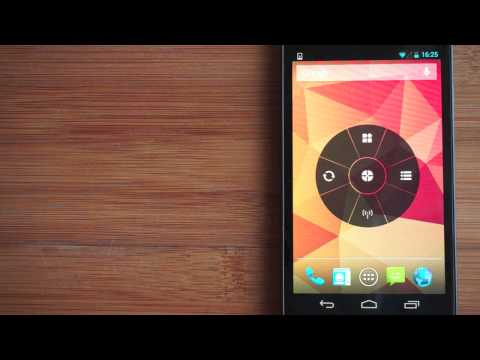
"The concept behind Floating Touch is simple: a small, customizable floating toggle resides wherever you place it on the screen. Tapping that toggle launches a dial chock-full of useful shortcuts – it's sort of like Acer's "Ring," but far more customizable." - AndroidPolice
Floating Toucher is specially designed for Android, which is a button floating on your screen over other apps, and you can move it anywhere. Floating Toucher contains most commonly used switches of Android system and all installed apps, you could control your device or open your favor app easily without exiting current app. Pie style of it control panel is elegant and easy to use. Support 3 screens to show more icons.
Besides that, you can make it unique by:
1. Customizing the panel functions, pick your most commonly used switches or favor apps.
2. Creating folder for apps or switches.
3. Changing the floating button style, or DIY your own button.
4. Changing the panel's color, or customize your own color.
5. Set the black list to auto hide the point.
6. Customize the click action of point.
Features list:
1. Clear memory
2. Back/Home button (Need ROOT)
3. Favor apps
4. Recent apps
5. Battery display
6. Lock screen
7. System switches
-Screen brightness
-Ring mode
-Bluetooth
-Wi-Fi
-GPS
-APN (Mobile network)
-Rotation
-Flashlight
-Airplane mode
-WIFI hotspot
Premium Features:
- DIY Point
- More Panels
- Point Auto Hide
- Create Folder
- Panel Color
- Custom Point Action
- Remove Ads
FAQ:
Why I cannot uninstall Floating Toucher?
The "Lock screen" feature requires activating device administrator, so you have to deactivate it in security settings before installing.
There are two ways to uninstall it:
1. Open floating touch, go to settings page, find the "Uninstall" option. (Recommend)
2. First, go to "System settings" -> "Security settings" -> "Device administrators" deactivate "Floating Toucher", then uninstall Floating Toucher in a normal way.
If you'd like to translate the app into your own language, please let us know!
If there is any problem or feedback, please let us know!
Our Email: floating.mob@gmail.com
Translation volunteer is welcome. please login and help to translate by
http://crowdin.net/project/floating-touch/invite